Easier shopping is here!

For those that wanted easier shopping, click on the shopping tab above or visit http://www.amychomas.com/

We are now taking credit card payments, or you can still use paypal! Any questions, you can send them to amyc222@yahoo.com

Want to learn how to use your new holders? Look to the right of my blog to see everything in categories!


Wednesday, August 31, 2011

Back to school with Chomas Creations mini Sharpie holder

It is that time of year again!  Time for my favorite commercial... It's the most wonderful time of the year, they're going back... back to school!  Where the dad is dancing down the aisles... hehe  They should really use a mom in that commercial! 
So because I'm soooo excited about back to school, I'm having a back to school sale!  You can get 10% off your entire order in the Chomas Creations store using the code back10 at checkout.
Being I have 4 kids that go to school each year, I get a bit behind on these back to school layouts!  So this is from last year, my daughter on her way to kindergarten.  You can get the Design Studio file for this page here... back to school
I used the Chomas Creations mini Sharpie holder to do the border and accents on this page on cork board.  Yes corkboard!!  There are so many surfaces out there that the mini Sharpies will write on that normal markers just can't handle!  This corkboard is by Quickutz.  They are 4x12 self adhesive sheets.
I used the Chomas Creations mini gel pen holder to make my own lined paper!  I used the file here for the horizontal lines, that I usually use for my journaling circles....  journaling circles  I drew all the lines in the Chomas Creations light blue glitter mini gel pen.
The back to school file has the vertical lines, I used the Chomas Creations red glitter mini gel pen for these.
This also made for some easy journaling on the page!
I designed the title with a shadow and cut it out of red and green paper.  The title is also on the back to school download.
Here is the completed layout!  The ribbon is Imaginesce.  And of course the patterned paper was made by me hehe!


Like what you see? Leave a comment to let me know!

Tuesday, August 30, 2011

Princess frame with Chomas Creations embossing kit


Don't forget there is a sale going on in the Chomas Creation's store!  Enter the code back10 at checkout for 10% off your total order!

Another one of my frames for the craft show (if I can let this one go hehe!).
I loved how the castle turned out on this card I made here... princess card  You can also get the download for it on that link.  Being I put all that work into the file, I figured why not use it again??  So I did!  I embossed it with the Chomas Creations embossing kit on a metal sheet.  Being it was an odd shape and I didn't want it to bend, I added it to a circle that was cut out of chipboard, and that I had added a piece of patterned paper on.
 I got the "princess" wood word from Michaels, it was already painted pink.  I added some crystal lacquer to the top of the word, then sprinkled glitter on it.  The glitter absorbed into the crystal lacquer and now I don't have to worry about it sprinkling off! 
The papers and ribbon are all Imaginesce. 


Like what you see? Leave a comment to let me know!

Monday, August 29, 2011

Puppy bows!!

Ok, so  not my normal kind of post, but it was fun, and I wanted to share hehe!
I picked up these puppy bows that were pre-made, but I thought they were kind of plain.  I had all these pretty stitched brads by Basic Grey, but they were brads, so I took my wire cutters to cut the brad parts off.
Then I used my hot glue gun to add the brads to my bows.
Here are the bows I got done tonight, I'm sharing with my sister's morkie, hehe! 
And here is my super model with her new bow!  Pay no attention to the messy face hehe!  Oh and my sweet daughter was helping me as my super model kept trying to wander away!


Like what you see? Leave a comment to let me know!

Friday, August 26, 2011

More Spice then Sugar with the Chomas Creations embossing kit

My husband found this note my daughter had wrote to her brother and his friend (keep in mind her brother can't quite read yet).  For those that struggle with 6 year old hand writing, this says "please knock boys but if you do knock you still can't come in".  That girl just cracks me up sometimes hehe!!  I had to include the note on my page, so I sprayed it with some make it acid free spray.  Did you know they make that stuff???  It is by Krylon!
Now if that isn't the start of a great scrapbook memory, I don't know what is hehe!!! 
Next I embossed the princess crowns with the Chomas Creations embossing kit for the Silhouette on Ten Second Studios metal sheets.  If you add the colored metal side down and emboss, you can then sand your raised image!
The title was done with Silhouette fuzzy vinyl.  No they do not have this pretty blue color in fuzzy vinyl,. but I used some Glimmer Mist sprayed on the fuzzy vinyl to get this pretty blue!
I was testing my lighting for a senior photo shoot I had to do, and popped my daughter on the backdrop for some quick pictures, so this one came in super handy for this page!  The papers, ribbon and stickers are all Imaginesce. 
Don't forget I'm having a back to school sale in the Chomas Creatons store!  Use the coupon code back10 at checkout to save 10% off your purchase!


Like what you see? Leave a comment to let me know!

Thursday, August 25, 2011

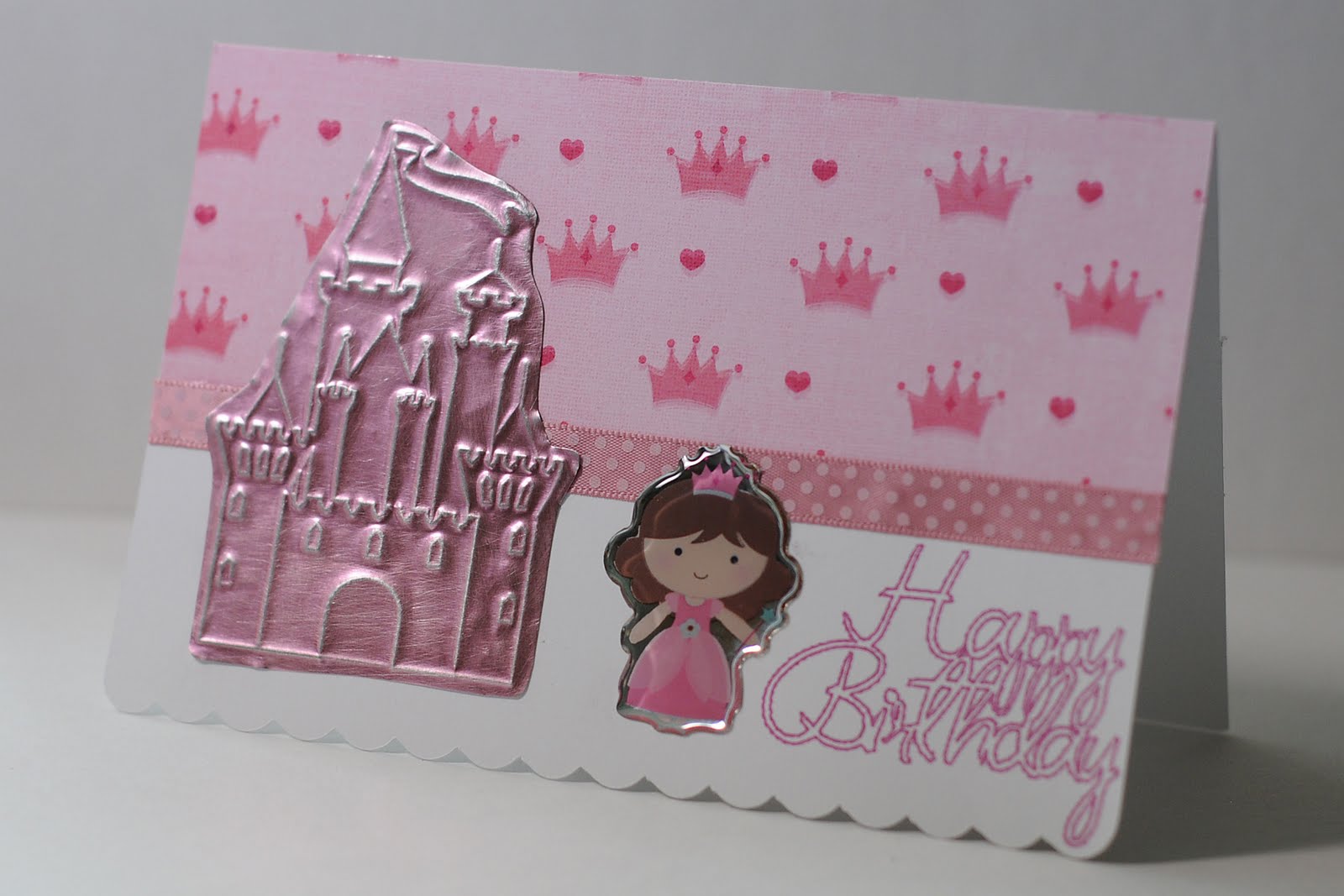
Happy Birthday Princess card with Chomas Creations embossing kit

I know this isn't a back to school project, but I want to have a back to school sale anyways!  I can't wait for my kids to go back so I can spend more time craftin (not to mention I think I am boring them a bit about now!)  Use the coupon code back10 to save 10% off on your purchase at the Chomas Creations store! 
I can't believe my daughter's 7th birthday is just around the corner!  These years sure fly by!  And if there is one thing my daughter it, it is a princess, so this card is perfect for her!
I used Design Studio with Wrap It Up for this card and you can get that file here...  princess birthday file
I noticed the sentiments were to skinny to cut with the Cricut, but I could still use the Chomas Creations mini gel pen holder and pink metallic mini gel pen to draw the sentiment instead, and that is just what I did!  Then instead of having to score my card after, I used the Chomas Creations embossing tip to score the card.  You can see the tutorial for that here...  card score tutorial
Then without removing the mat from the Cricut machine, I removed the embossing tip and added the blade to cut the card.
I used the Chomas Creations embossing kit again to emboss the princess castle on Ten Second Studios metal sheet!  These metal sheets are so easy to cut after you emboss on them.
The paper, ribbon and princess sticker are all Imaginesce.  Love these matching lines for making a project easier!


Like what you see? Leave a comment to let me know!

Wednesday, August 24, 2011

Live laugh love frames with the Chomas Creations embossing kit

A friend of mind talked me into doing a craft show with her this year and I thought it was a perfect way to use up some of my stash!  And it is also that time of year (kids going back to school, yipppeee!) to get a start on handmade Christmas presents!  We started with some of these handmade frames!  I like to use Mod Podge painted on to adhere my patterned papers to the frames.  I then use eyelet screws to hold ribbon on the frames.  This 3 photo frame was my friend's idea, and the back ribbon is stapled on. 
I embossed the "live, laugh, love" using the Chomas Creations embossing kit and Make-the-Cut.  You can download that file here... live laugh love file
If you download the file you will notice the words are backwards.  That is because I put my metal sheet colored side down on my mat, so when you emboss it and flip it over, it will face the right way.  I then sanded the raised image.
I added some chipboard ovals behind my live laugh love designs to make sure they didn't get bent on the frames.  The papers and embellies are all Basic Grey's Kioshi line. 
I used the Chomas Creations mini gel pen holder to add the "your photo here" sentiment to add to the frames!


Like what you see? Leave a comment to let me know!

Monday, August 22, 2011

Making a Splash with Chomas Creations embossing tip

Awhile back I did a post on the difference between the Chomas Creations embossing kit and engraving tip.  I took 2 sheets of white paper and used both tools with the Cricut and the same pattern, then chalked them to see the difference.  Here is that post... difference between embossing and engraving
I already used the sample of paper with the engraving tip, and I still had this piece sitting around from the embossing sample and put it to work on this page! 
Here is the close up of the Chomas Creations embossing kit on white cardstock that was then chalked.


I also used a journaling circle that I have on hand using the Chomas Creations mini gel pen holder, you can see that tutorial here... journaling circle


I needed a good title for this page, and used My Cut Search to do just that!  Sometimes you have no clue that something like Sports Mania would have the perfect title like make a splash!  I used some crystal lacquer to cover the title to make it look wet.


Here is the finished layout, along with my little guy making a splash!  The papers are all Quick Quotes, perfect summer colors! 


Like what you see? Leave a comment to let me know!

Saturday, August 20, 2011

Man of many words with Chomas Creations mini gel pen holder

One thing I did as my children grew is recorded the silly things they did and said.  I had a blog going and I tried to update it a few times a week with these silly things, and important milestones.  You could also do this on a calendar or a journal.  The blog was easiset for me as I catch up every night on my lap top.  Now when I find pictures I can go back and find some sort of story to go with them.
For this layout I used Plantin for the title and welded the words together in DS.  The journaling circle was also done with the Chomas Creations mini gel pen holder,  DS and George.  You can find the tutorial for that here... journaling tutorial
I had these chipboard stars sitting around and added some ink to them to make them match the kraft cardstock.  Gotta use up some of that stash!


Like what you see? Leave a comment to let me know!

Thursday, August 18, 2011

gosh you're awesome with Chomas Creations mini gel pen holder for the Silhouette

Kids are amazing creatures!  They never stop amazing you!  My youngest daughter came home from school with this picture she had done.  I looked at her little person she colored to figure out what the shirt said and found out she had written the words backwards, thing was, if she was looking down at the shirt, that is what she saw!  Her shirt said Champion Talker (sooo true), and she copied it letter for letter, just backwards hehe!
Some of you may know that I love my journaling circles and shapes.  Let me let you in on a little secret, I used to spend a ton of time using the computer to do my journaling, now I just use these, and it is a bazillion times faster!  And with the lines it really helps keep things neater looking. 
I made this file for Studio with 6 journaling circles inside.  It is actually quite easy to use with the Chomas Creations mini gel pen holder for the Silhouette!  You can download the Studio journaling circle file here... journaling circles
To start, you  need to click on the outside circles for each journaling circle (1), then click on the cut option on the top tool bar (2), then click no cut as we want to draw the lines first.
Add your Chomas Creations mini gel pen holder for the Silhouette in place of the blade. Set your pressure around 10, speed of 10. I do double cut for these lines so they are nice and dark. 
Now select all of your circles (1) and click on no cut (2).
Next click just outside of each circle to select it (1) and click on cut (2).  Now you can cut your circles with the Silhouette.  Without removing your mat, carefully remove the Chomas Creations mini gel pen holder and replace it with the blade.
I like to do a bunch of these at a time to have on hand whenever I need them.


I used the gosh you're awesome title from the Silhouette downloads.


The papers for this page are all Echo Park.  The ribbon and flowers are Making Memories.  The daughter is mine hehe!


Don't forget the sale is still on in the Chomas Creations store!  You can save 10% off your purchase of $30 or more using the coupon code august10 at checkout.


Like what you see? Leave a comment to let me know!

Tuesday, August 16, 2011

Birds of a feather with Chomas Creations embossing kit

While browsing the dollar store my mom noticed these funny pink flamingo sunglasses (she LOVES pink flamingos, they are what you think of when you think of her) and we thought it would be funny to get some for all of her grandkids and get a photo!  This is what we came up with, and I'm sure it will make her Christmas card this year hehe!
I started this layout using the Chomas Creations embossing kit on Ten Seconds Studios metal sheets.  I then sanded the raised image to get this look!  You can get the file of pink flamingos with the title if you want to try it yourself... pink flamingo file
.
I used the Chomas Creations mini gel pen holder for the journaling circles as well.  You can find the tutuorial for this here... journaling circles
The title was done with Design Studio and Birthday Bash.
Here is the page, along with all the silly grandkids and my mom!  The tallest one is my 5'11" 13 year old son!  He has passed us all up!
Don't forget I'm having a sale in the Chomas Creations store!  10% off your purchase of $30 or more using the code august10 !


Like what you see? Leave a comment to let me know!

Monday, August 15, 2011

Dog tags with the Chomas Creations engraving tip!

Oooh I had a cute pink flamingo page all prepared for today and have to wait till tomorrow to show you cause of how excited I am about the dog tags I made last night with the Chomas Creations engraving tip!
I found these Darice blank tags in stars, hearts and circles at a craft store.
I added them to my scanner and scanned them in with a white sheet of paper on top of them so they would show up better.
I used the trace function in Make-the-Cut to trace in the shapes.
I then used the Chomas Creations mini gel pen holder to draw the shapes out onto a scrap piece of paper.
Next I used some of the Zip Dry glue to attach the tags on top of my drawn shapes.  The Zip Dry glue is like rubber cement and will rub away off of the back of your shapes when you are done.  I let it dry for a minute so the shapes wouldn't move.
I then put the mat back into the Cricut machine the same way it was when I drew the shapes. I used the thin paths feature in MTC to make the fonts thin that I was using.  (The black on my design is to hide my phone number, it is not on the actual pattern)
I inserted the Chomas Creations engraving tip and used multi-cut of 3 to engrave or etch the words into my tags. 
This was tough to get a good picture of, and of course I had to blur out the rest of my phone number, but I hope you get the idea!!!  I'm sure there are more types of tags out there you could do the same thing with!  My new puppy will be wearing the heart one hehe!  You could use this same idea for anything you want to either draw on, or engrave on.  Click on the photos to see them even better.


Like what you see? Leave a comment to let me know!