Easier shopping is here!

For those that wanted easier shopping, click on the shopping tab above or visit http://www.amychomas.com/

We are now taking credit card payments, or you can still use paypal! Any questions, you can send them to amyc222@yahoo.com

Want to learn how to use your new holders? Look to the right of my blog to see everything in categories!


Showing posts with label shared MTC files. Show all posts

Wednesday, August 08, 2012

Zebra card with Chomas Creations adjustable pen holder

Well it was time to experiment with the Zing again as I got some extra mats!  I added one of the Chomas Creations embossing mats to a Zing mat so I could work with some embossing!  My first experiment was on Core'dinations cardstock.  This cardstock has a color on one side and either black, brown or kraft on another.  So when you emboss on the white side of the one I chose, the black side is raised, and when you sand the white shows through.  I used a stylus in the Chomas Creations adjustable pen holder and set the force of the Zing to 160 and used a multi cut of 2.
When you sand the raised image this is what you get!  I have the zebra print for MTC for share here... zebra print

I added the thanks to the front of the card and it is done!


Like what you see? Leave a comment to let me know!

Monday, August 06, 2012

Ouch with Chomas Creations adjustable marker holder


My son Jack had a little run in with a tree on his bike (thank goodness for helmets!!!) and ended up with quite a bit of road rash!  This whole page is a bit of a scrap lift (something easy to do when you are in a rut!)  Someone else had stamped the thought bubbles, but I thought I would just cut them out instead.  I used the Chomas Creations adjustable marker holder in the Zing with a Zig Ball pen.
I drew the "ouch" pattern and the title on a 12x12 sheet of kraft cardstock with MTC.  I have the file for share here for this page... ouch  The font is a Lettering Delights thin font called Typewriter.
I wanted to layer this page, and thought it would be a lot easier to use the negative space instead of all the thought bubbles to the page.  But of course I couldn't throw out all the thought bubbles, so I added journaling lines to them with the Chomas Creations adjustable pen holder and a Pilot Precise V5 and can use them on another page!
I added some clouds to the top of the page, and used the same cloud pattern to add to the tree. 
Here is the completed page with my boo boo boy! 


Like what you see? Leave a comment to let me know!

Sunday, July 29, 2012

Taylor with Chomas Creations adjustable marker holder

Look what made its way into my life this last week... It is a Zing!  Sandy of  I love KNK figured I needed one becaues she wants to see what I can do with it!  I have been playing with it with some of the Chomas Creations tools, and can I just say, WOW THAT IS SOME POWER!  First I tried it out on a metal 12x12 sheet I had big plans for with the Chomas Creations engraving tip, and this is what I got with it in the Zing!
I used these settings in the Zing:  force 160  speed 10 and multi-cut of 3-5 (didn't make enough of a difference to do 3, 4 or 5 so I will just stick with 3 next time)

Then I wanted to see what it would do on acrylic!  The settings are as listed.  The same meal sheet is behind the acrylic so that I could get a picture of it.
Of course I also had to test out the Chomas Creations adjustable marker holder!  I did try one of the Papermate Flair pens in the Zing without a holder and as you can see it just can't get a good grip on the marker, it could wobble back and forth.  I'm using Sandy' suggestion of the 25 post it notes in a stack to measure the height of the marker here.
So I used the Chomas Creations adjustable marker holder in the Zing for more support and it left no room for wobble! 
This is a harlequin pattern I made quite awhile ago for MTC.  You can get the file here...  harlequin background  I used the Chomas Creations adjustable marker holder with the Papermate Flair pen.  I used a force of 10 and a speed of 10 on the Zing.  After I drew the pattern I used the Copic markers in just a few of the diamond shapes to color them in.
The title was also cut with the Zing.  Smooth like butta!  (that is like butter hehe!)
I kept this page simple and just added some ribbon and a senior picture of my beautiful daughter!
There are so many different kinds of pens you can fit in the Chomas Creations adjustable pen holder for the Zing (this will center the pens in the holder).  Think glue pens and ball point pens and most gel pens, oh my!
Here is a Sakura Glaze gel pen in the Chomas Creations adjustable pen holder drawing with the Zing.


And if it doesn't fit in the adjustable pen holder there is always the Chomas Creations adjustable marker holder!  It holds up to 1/2 inch in diameter and will give all markers the support you need!
Here is the Chomas Creations adjustable marker holder with an ultra fine point Pilot Precise V5 (you can see how smooth it drew the design, and super thin to!)


Like what you see? Leave a comment to let me know!

Monday, July 02, 2012

4th of July with Chomas Creations adjustable pen holder

One of my fav holidays is the 4th of July!  Not just because of the cool fire works, but also because of how important this day is to our country!  And if I haven't stressed it enough our parts are all manufactured in the good old USA! 
I picked up these cute papers by Pebbles Inc and knew I needed some stars to go with it!  So I used the Chomas Creations adjustable pen holder for the Cameo with a stylus to emboss on a metal sheet.  After you add your mat with an embossing mat to the Cameo, you simply add the Chomas Creations adjustable pen holder in place of the blade, and use the popcycle stick that comes with every holder to adjust the height of the stylus.


This file for the stars is available for MTC here... star background.   I resized the file in MTC to make smaller stars.  By adding the metal sheet to my embossing mat color side down, after embossing I was able to sand the raised image. 

I used the font 2 peas airplanes to design the title in MTC as well.

I made the doodle journal circles using the Chomas Creations adjustable pen holder with a mini gel pen and the file from MTC that you can find here... doodle journal circles
Here is my completed page, along with some glittery ribbon! 


Like what you see? Leave a comment to let me know!

Monday, June 04, 2012

Thank you card with Chomas Creations adjustable marker holder

I have to work on some end of year thank you cards for the kids' teachers this year, and  here is one I came up with!  I was thinking the white gel pen would look like chalk on the chalk board (although they use smart boards at my kids' school!).  So I used the Chomas Creations adjustable marker holder for the Cameo with the Signo white gel pen to draw the Lettering Delights thin font called Teacher in MTC.  You can get the share for this file on here... abc thank you


Like what you see? Leave a comment to let me know!

Saturday, June 02, 2012

2012 card using Chomas Creations adjustable marker holder

If some of you read my facebook page you may know that I have a high school graduate this year! My oldest daugther graduated summa cum laude (which means she got a GPA of 3.8 or higher all of her 4 years in high school!) and that I am one proud mommy! And that explains the lack of blog play lately!
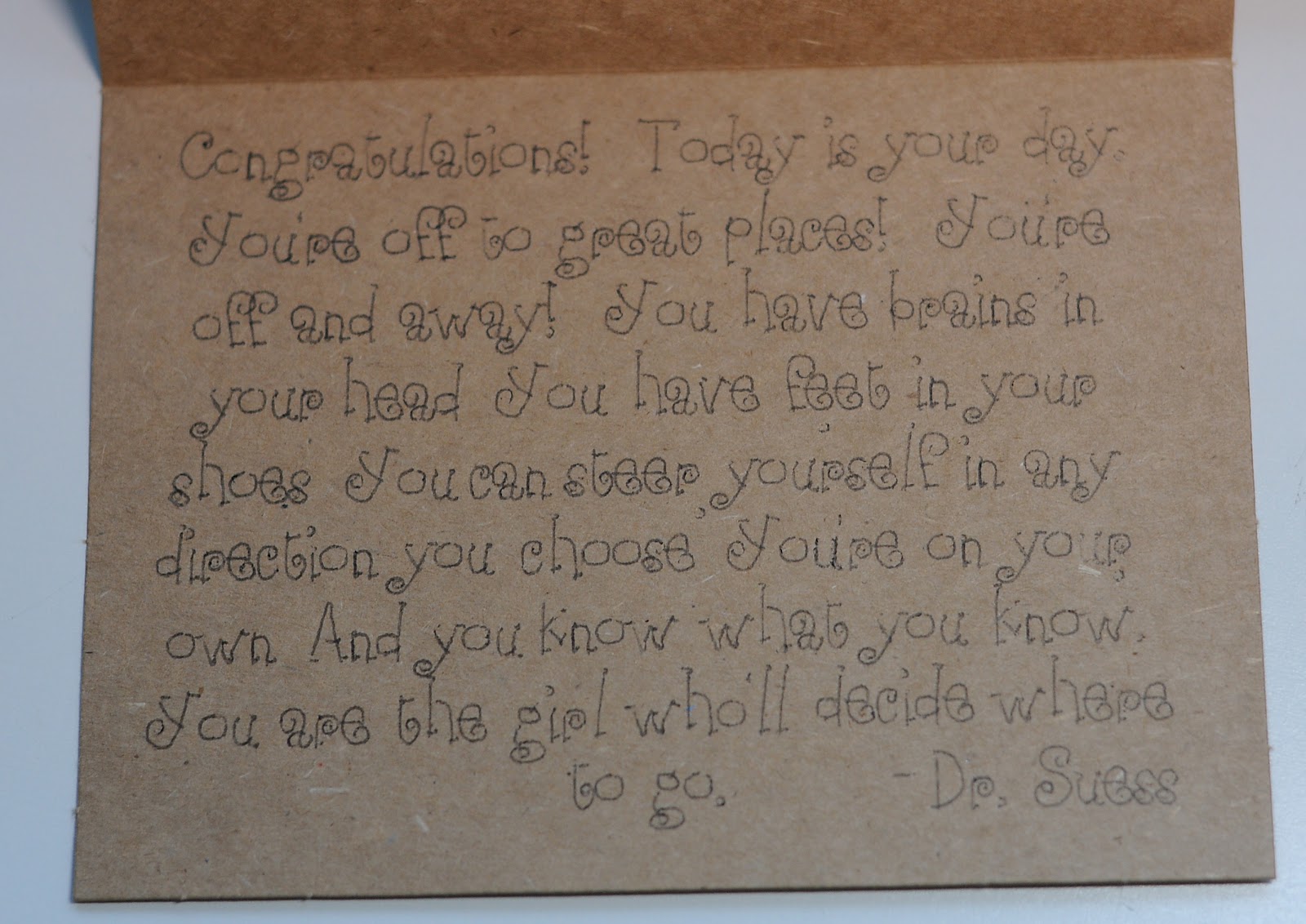
I will be going to a few grad parties this summer, so I got a start on some cards!  I made the inside sentiment, which is a Dr. Suess quote (I did put girl instead of guy in the quote).  I drew this inside the card using the Chomas Creations adjustable marker holder and a Sharpie liquid pencil.  I used MTC with thin font from Lettering Delights (these are single line fonts in MTC!  or they are thin fonts in Studio as they have a TTF version).  The font is called Eesome.  If you want the quote to use in MTC I have the download here... grad quote


The outside of the card is a share that Kay of Clever Someday has on her blog!  Hop on over there and thank her for the awesome share!   I cut this out using fuzzy vinyl so there is texture on the front of the card.


Like what you see? Leave a comment to let me know!

Wednesday, January 18, 2012

Happy Birthday sketch card with Chomas Creations adjustable marker holder


I wanted to have some creative fun with my feet up, so I pulled out the good ole' Wacom tablet and started drawing in MTC (Make-the-Cut).  I found you can draw a lot smoother in MTC then you can in Silhouette Studio.  You can change around the smoothing and precision for drawing in MTC as well, which helped a lot with my flower sketch, which you can download for MTC here... flower sketch
To make card making easier this year, I invested in a 50 pack of 4x5.5 inch cards with envelopes in kraft color.  I added this to my mat and drew right on it.

I used layers in MTC as well, so that I could draw in different colors of Sharpie glitter paint markers using the Chomas Creations adjustable marker holder.  To do this, it is as simple as turning off layers (clicking on the eye to turn off a layer).  As you can see I turned off the grass and flower stems and then drew the petals and happy birthday sentiment first. 
Then insert the Chomas Creations adjustable marker holder into the Cameo & add the Sharpie paint marker into the holder.  Draw your images on a pressure of 8, and speed of 5.  Do not remove your mat from the machine.
Now swith the layers that are on and off, so that the grass and stems are now showing.  Replace your Sharpie paint marker in the Chomas Creations adjustable marker holder (you do not need to take the holder out of the machine) with a green marker.  Now draw these images.
This is a pretty simple card.  I did add some Viva Decor glitter glue to the center of my flowers. 


Like what you see? Leave a comment to let me know!

Saturday, December 17, 2011

Frosty the snowman layout with Chomas Creations adjustable pen holder

I liked how my Frosty the snowman card turn out so much that I decided to turn it into a scrapbook page!  You can download the file for MTC for this one here... Frosty 12x12  I also added a snowman to this one that is included.  The font I used it called Play Date and you can download it here... Play Date font
Don't forget to use the coupon code december10 at checkout in the Chomas Creations store to save 10% off your entire purchase!
I used the Chomas Creations adjustable pen holder for the Cameo with a white gel pen to draw the background for this page.  The key to drawing your journaling like this is to look for thinner fonts so they look like they are single lines.
I also drew the snowman for this page.

I also used the Chomas Creations adjustable pen holder to draw the lines for this journaling circle.  You can find the tutorial and download for it here... journaling lines
.
I added some fuzzy vinyl snowflakes to finish the page.  The Cameo does an amazing job cutting vinyl and this fuzzy vinyl as well!


Like what you see? Leave a comment to let me know!

Thursday, August 04, 2011

Flamingo card with Chomas Creations embossing kit for the Silhouette

I was sent some metal sheets from All that Jazz Supplies to try out with the Chomas Creations products, and let me tell you how awesome the metal sheets they have work with the Chomas Creations adjustable pen holder Silhouette Cameo with a stylus!  Well you can see that here hehe!  And they are heat activated, so no need for glue, you can just heat it up with your heat embossing gun, or an iron!  Super easy! 
Here is a card I made with MTC, you can download the flamingo design here... flamingo design for MTC  I also used the Chomas Creations adjustable pen holder and gel pens to make the circles on the card, and the Chomas Creations  adjustable pen holder and stylus to score my card!
For the inside of my card I used K Andrews stamp set Positive Thoughts and Quick Quotes paper and ink to stamp with.


Like what you see? Leave a comment to let me know!

Wednesday, March 09, 2011

Beary Cute card with scoring tutorial for Make-the-Cut

Looking for an easy way to get that folded edge on your cards? Well here goes, it is easier then you ever
thought!
The Make-the-Cut file for this Beary Cute 4x6 card is located here... Beary Cute card
I started with the embossing page of the file, which is just a straight line. I used the Chomas Creations embossing tip on max pressure (I did NOT use the embossing mat for this, just the embossing tip, I used a regular Cricut mat) on multi-cut of 2. This left a scored, or embossed edge on my paper.
Without removing the mat from the Cricut, I used the cut page of my file, carefully replacing the embossing tip with the blade.  This cut my card out.

Again, leaving the mat in the machine, I carefully replaced the blade with the Chomas Creations mini gel pen holder and pink glitter mini gel pen and drew the graph design on my card.

Now you can take the mat out of the Cricut!  The scored line is now easy to fold!  I gave it a quick fold, then used my bone folder on the edge of the card to give it that smooth folded edge.

The cute bear was embossed with the Chomas Creations embosing kit.  I had an extra bear embossed from another page I am currently working on, so thought it would look cute on this card!
The title is part of the file if you choose to use it on your card.


Like what you see? Leave a comment to let me know!